CKA Task 3
Managing Application Initialization with Init Containers
Task Objective
Create a deployment named:
lab153deploy
Requirements:
- Run the nginx image.
- Wait 30 seconds before starting nginx.
- Use an initContainer to perform the delay.
💡 Exam Tip: If a question asks to delay application startup, the expected answer is usually an initContainer.
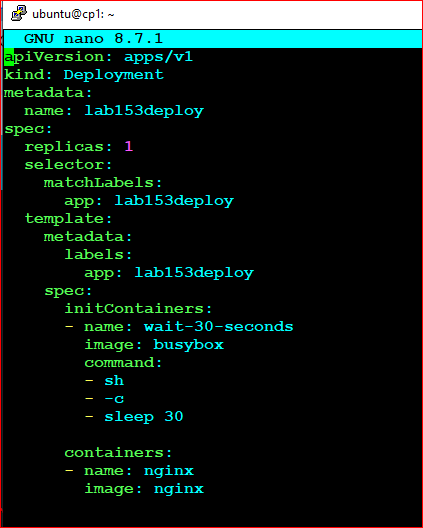
Step 1 - Create Deployment YAML
apiVersion: apps/v1
kind: Deployment
metadata:
  name: lab153deploy

spec:
  replicas: 1

  selector:
    matchLabels:
      app: lab153deploy

  template:
    metadata:
      labels:
        app: lab153deploy

    spec:

      initContainers:
      - name: wait-30-seconds
        image: busybox
        command:
        - sh
        - -c
        - sleep 30

      containers:
      - name: nginx
        image: nginx
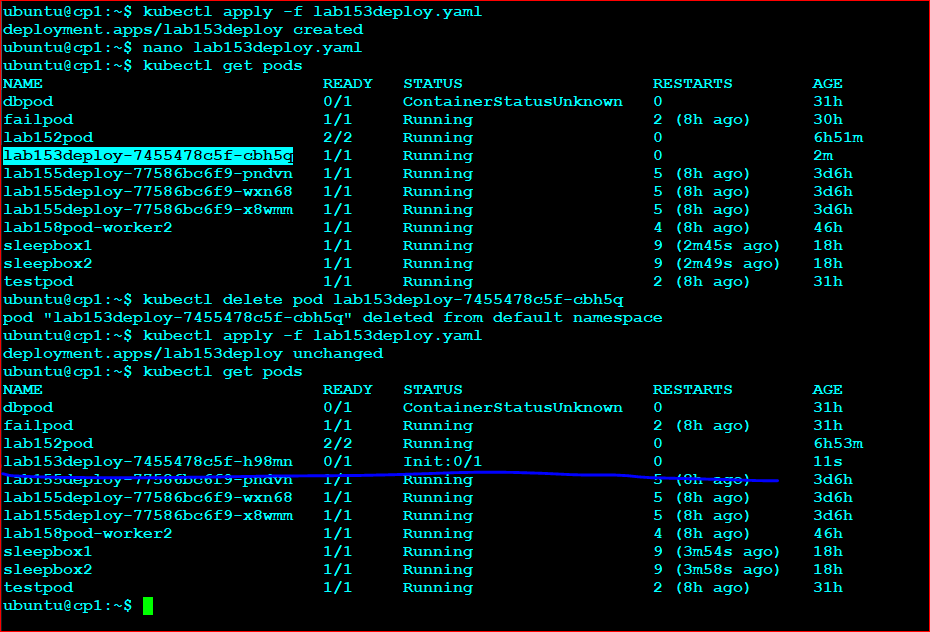
Step 2 - Apply the Deployment
kubectl apply -f lab153deploy.yaml
Step 3 - Verify Pod Initialization
kubectl get pods
During startup you should see:
NAME                         READY   STATUS
lab153deploy-xxxxx           0/1     Init:0/1
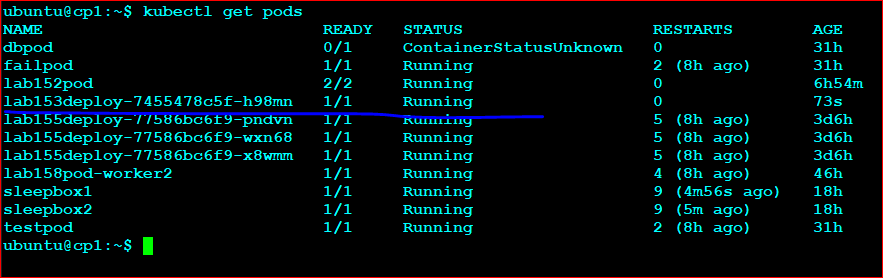
After approximately 30 seconds:
NAME                         READY   STATUS
lab153deploy-xxxxx           1/1     Running
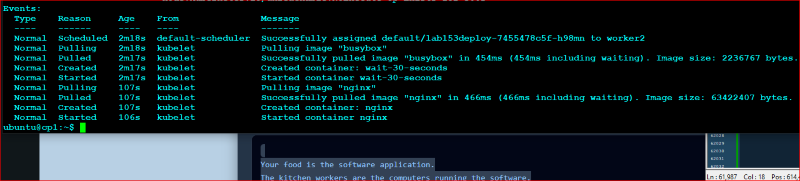
Step 4 - Verify the Init Container
kubectl describe pod
Look for:
Init Containers:
  wait-30-seconds:
    State: Completed
This confirms the initialization completed before nginx was started.
Fast Exam Method
kubectl create deployment lab153deploy \
--image=nginx \
--dry-run=client -o yaml > lab153deploy.yaml
Edit the YAML and insert the initContainer section.
📝 Memory Hook:
Init Container = "Do this first."
Main Container = "Start only after init completes."
Sleep 30 → nginx starts 30 seconds later.
Init Container = "Do this first."
Main Container = "Start only after init completes."
Sleep 30 → nginx starts 30 seconds later.
Screenshot Area